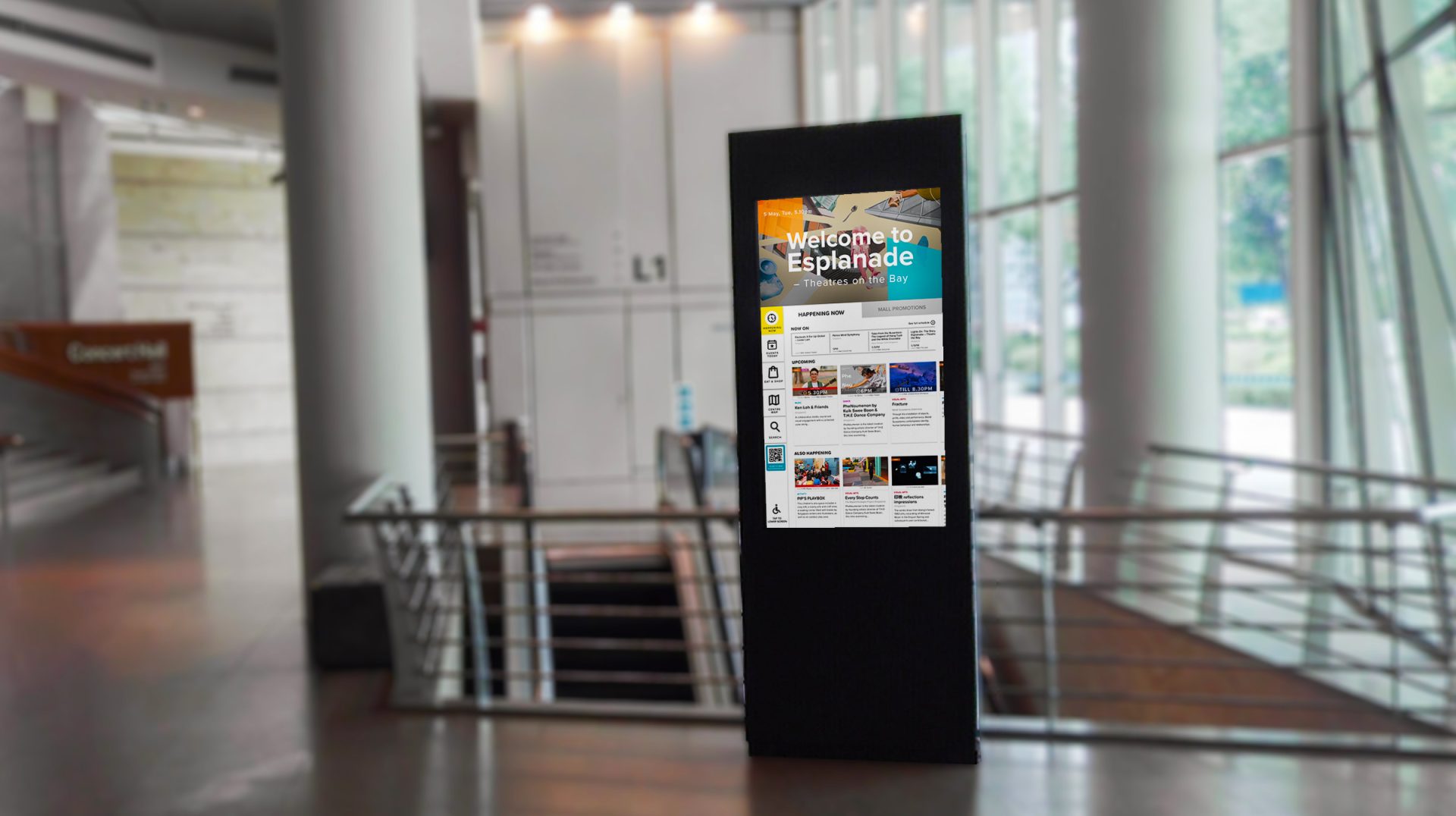
The Digital Concierge serves as a welcoming beacon, offering interactive guidance that helps visitors quickly and comprehensively discover the richness of Esplanade’s offerings.
Designing Singapore’s National Performing Arts Digital Concierge Experience
Task
Cross-functional collaboration, Design Sprint, Usability Testing, Rapid Prototyping
-
Client
The Esplanade Co Ltd
-
Role
UX/UI Designer
PROBLEM STATEMENT
The business challenge
Esplanade, Singapore’s National Performing Arts Centre, is renowned not only as a haven for arts enthusiasts but also as a prominent landmark frequently traversed by visitors.
Many of these visitors, including tourists and locals alike, enter Esplanade without realizing its cultural significance or the wide array of accessible performances, activities, and amenities it offers. The digital kiosk was strategically designed to capture the attention of these visitors, providing them with a quick yet comprehensive introduction to Esplanade as a key cultural hub in Singapore.
Visitor Awareness
A significant challenge was that many visitors, particularly tourists, enter Esplanade without any prior knowledge of its status as Singapore’s national performing arts centre. This lack of awareness meant they often missed the opportunity to explore its rich cultural offerings and experience the full breadth of what Esplanade has to offer.
Engagement and Navigation
With its multiple entrances and complex layout, there was a critical need to guide visitors effectively at Esplanade. The digital kiosk was introduced to help visitors effortlessly discover performances, shops, restaurants, and other cultural offerings, enhancing their overall experience and making it easier for them to navigate the venue.
Cultural Promotion
It was essential to enhance the visibility of ongoing and upcoming events to encourage spontaneous visits and extended stays, thereby deepening visitors’ engagement with the arts and promoting a greater appreciation for the cultural experiences available at Esplanade.
RESEARCH & FINDINGS
Methodologies
Research Objective
The goal of our research was to deeply understand who our visitors are, what their goals, needs, and the context of their visits are. We aimed to identify their pain points and motivations and uncover opportunities to enhance their start-to-end journey at Esplanade. A critical part of this research was to determine how the digital kiosk could address these needs and improve the overall visitor experience.
To achieve a comprehensive understanding, I have employed a mixed-methods approach combining both primary and secondary research.
PRIMARY RESEARCH
User Interviews
The primary goal of interviewing 5 potential users was to understand visitor behaviors in finding places of interest while traveling. These interviews aimed to reveal their motivations, preferences, and challenges to refine the digital kiosk's features, enhancing the experience for Esplanade’s visitors.
PRIMARY RESEARCH
Stakeholder Interviews
The stakeholder interviews provided essential insights that informed the development of the digital kiosk, ensuring it meets the multifaceted needs of Esplanade’s operations and marketing efforts. This collaborative approach helped tailor the kiosk features to enhance visitor engagement, promote offerings effectively, and support the venue’s strategic marketing initiatives.
SECONDARY RESEARCH
Visitor Research
I analysed past visitor research conducted at Esplanade to understand historical visitor behavior patterns, preferences, and feedback. This review helped identify consistent trends and pain points in visitor experiences over time, guiding the focus on necessary enhancements for the kiosk.
SECONDARY RESEARCH
Kiosk Experience and Wayfinding Studies
I studied kiosk designs in Singapore malls and examined case studies from solutioning companies to identify best practices and innovative features.
RESEARCH & FINDINGS
Key Findings
Visitor Information Processing
Visitors, particularly first-timers, can be overwhelmed by too much information upon entry. It is essential to present only the most critical details to prevent cognitive overload which results in disinterest.
Design for Inclusivity and Accessibility
Design strategies should cater to a diverse range of visitors, including persons with different physical and sensory abilities. It’s essential to make sure visitors can easily access and use the facilities, ensuring a welcoming environment for everyone.
Wayfinding Needs
First-time visitors or those who rarely visit, need clear wayfinding assistance to navigate Esplanade effectively. Clear and intuitive wayfinding solutions are crucial to help them discover all that Esplanade has to offer, enhancing their overall experience.
However, wayfinding is a complex process with many aspects to consider. A single touchpoint is not enough to address all wayfinding challenges. Instead, multiple coordinated touchpoints throughout the centre are required to ensure a seamless and comprehensive navigation experience for all visitors.
SOLUTION
Tackling the Challenge
How might we...?
01.
Provide visitors with immediate orientation upon entering Esplanade to ensure they know where they are and can easily access information about the venue?
02.
Ensure that visitors are well-informed about the activities of the day at Esplanade, including events, amenities, and promotions?
03.
Help visitors, especially those with accessibility needs, navigate efficiently to their event venues and amenities within Esplanade?
We will...
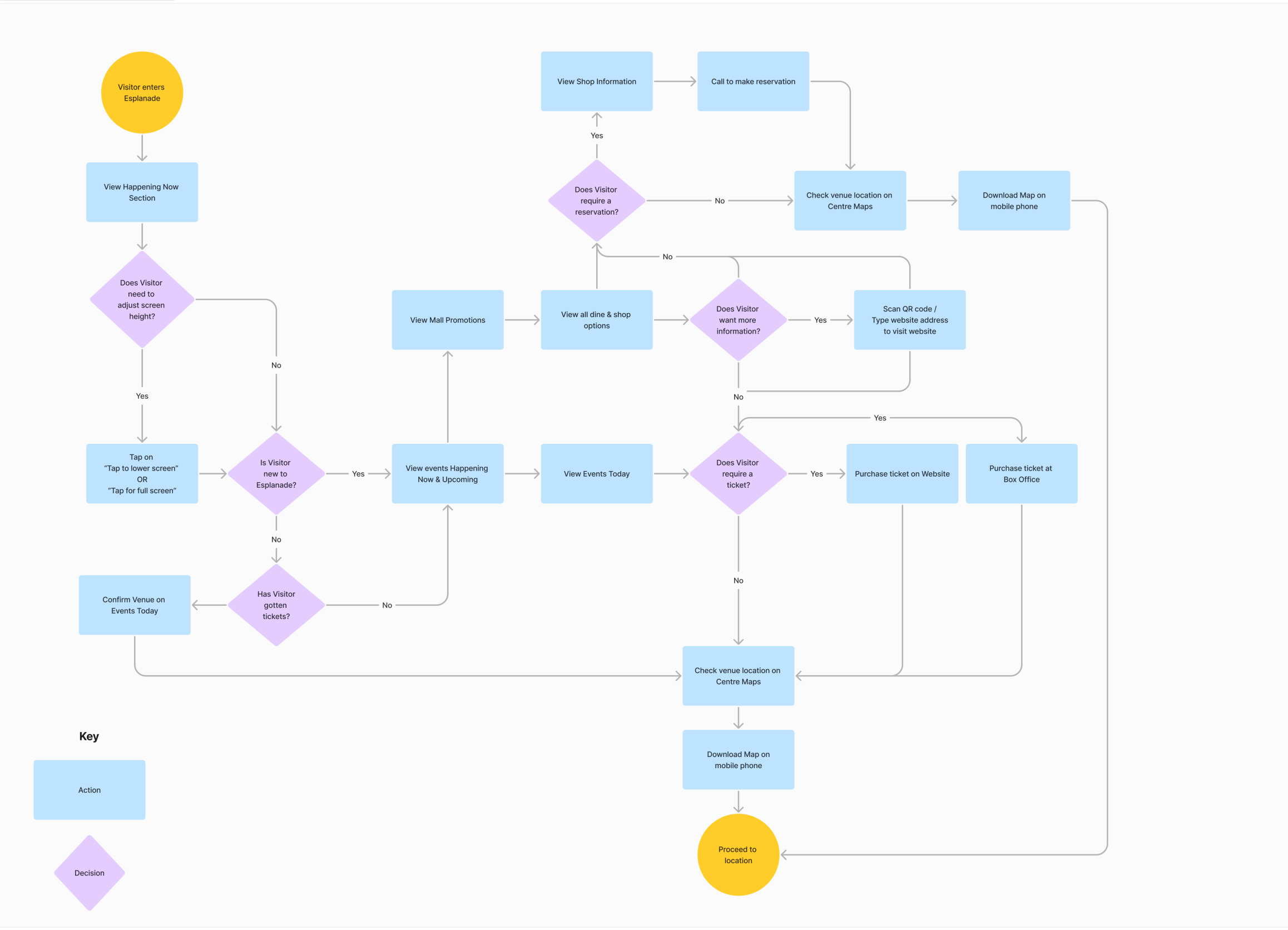
Install digital kiosks at key entry points that welcome visitors and provide comprehensive venue information immediately upon arrival.
Leverage on existing systems to populate event, and mall information automatically. Frequent refreshes will ensure the information in the kiosk is kept up to date.
Support wayfinding by providing interactive mobile maps to help direct visitors to their location.
The Design
01. Welcome to Esplanade – Theatres on the Bay
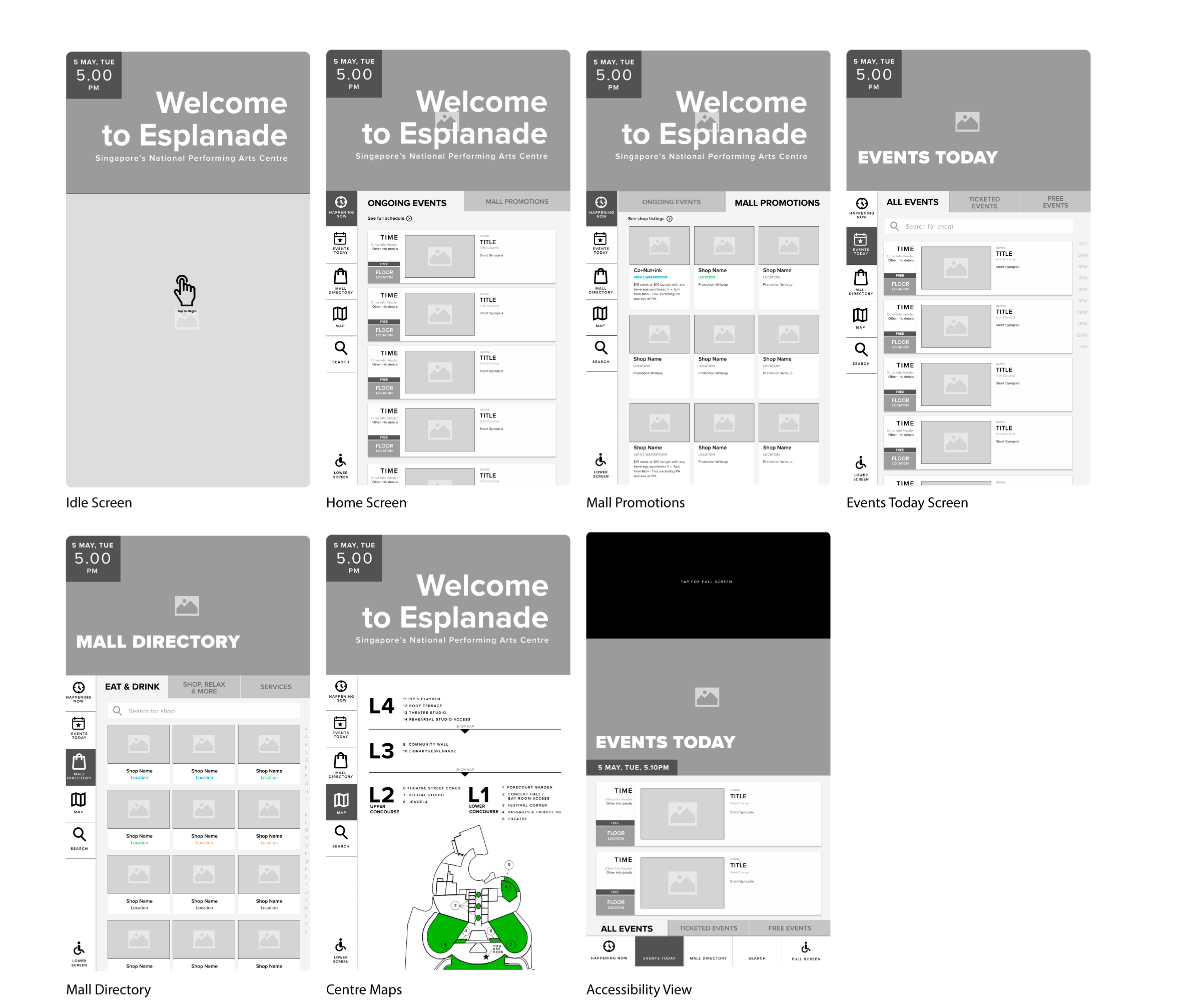
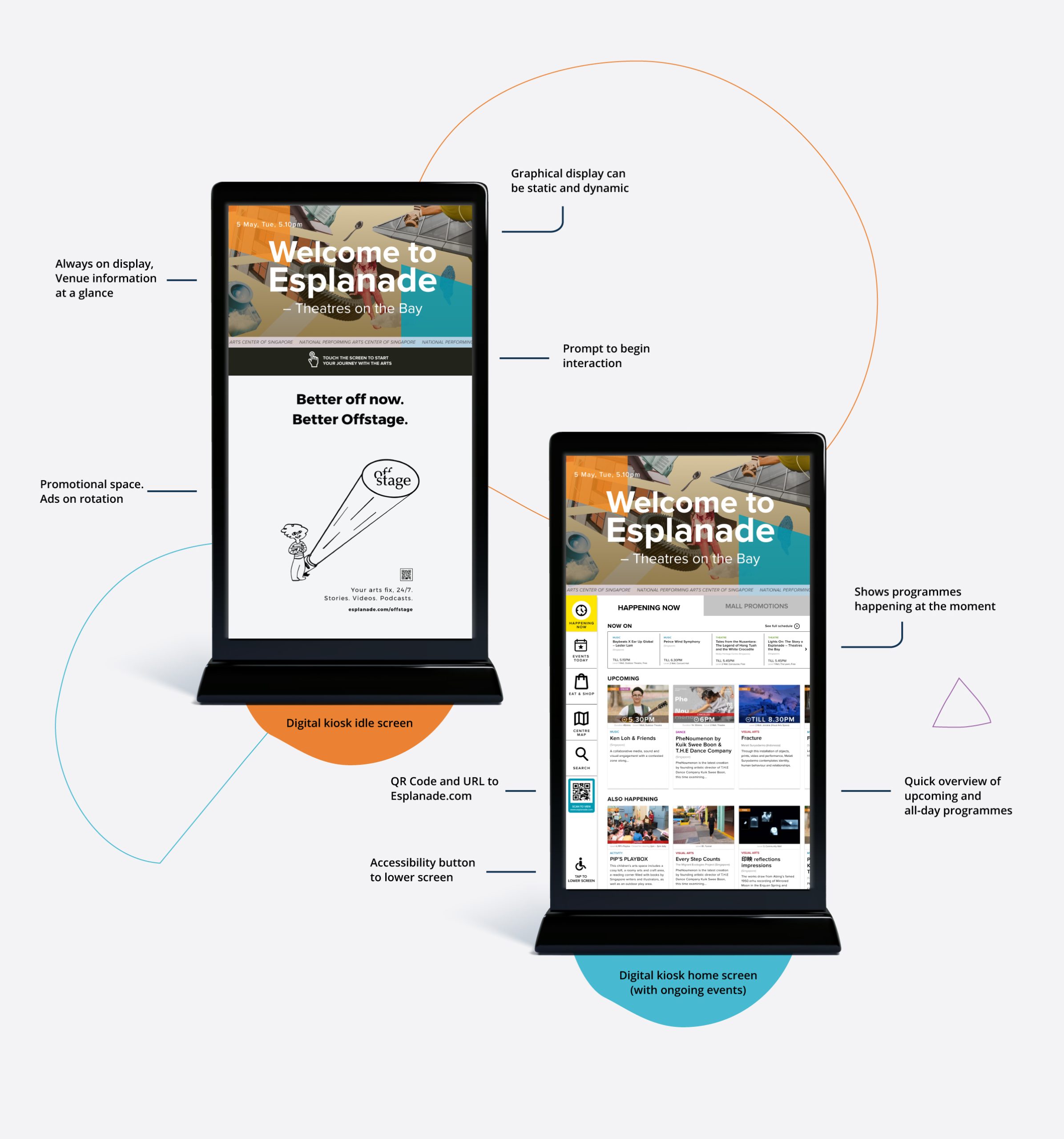
The digital kiosk was designed to give visitors an immediate sense of arrival, allowing visitors to know where they are at upon entry. The kiosk ensures that either the idle screen or the home screen is always active after a period of inactivity, with a dedicated section to warmly welcome visitors to the venue.
On the first interaction, visitors will be informed of what Esplanade has to offer, highlighting events and promotions that are ending soon to ensure visitors have the opportunity to attend them from their first interaction.
Welcome Section
1/3 of the screen is perpetually reserved for welcoming visitors to Esplanade. The venue name will always be there, regardless of the greeting.
The area supports both static and dynamic background elements, allowing for thematic customisations to enhance the ambiance, especially during festivals and special events.
Events Prioritisation in 'Happening Now'
This screen provide real-time updates of events and promotions, organised into specific sections for ease of navigation and decision-making.
To ensure accuracy, all information will be refreshed periodically and pulled directly from Esplanade.com by the system.
Now On: This section appears when there are events currently in progress. It provides a concise view of ongoing events with their end times prominently displayed. This design helps visitors quickly assess the remaining duration and decide if they want to catch the latter part of the event.
Visitors are encouraged to head towards the venue promptly if they're interested in joining the event already in progress.
Upcoming Events: Highlight events that are scheduled to start soon. Offers a preview of soon-to-begin events, helping visitors plan their visit and ensure they don't miss out on starting events they’re interested in.
All-Day Events: List events available throughout the day. This section ensures visitors are aware of events that aren’t bound by specific start times, allowing for flexible planning and participation at any time of the day.
Quick access to Esplanade Website
On the navigation, a QR code and a URL for Esplanade.com are prominently displayed for visitors who wish to explore more information online.
This will also provide an alternative for visitors to make any ticket registration or purchases if required.
02. Events Today
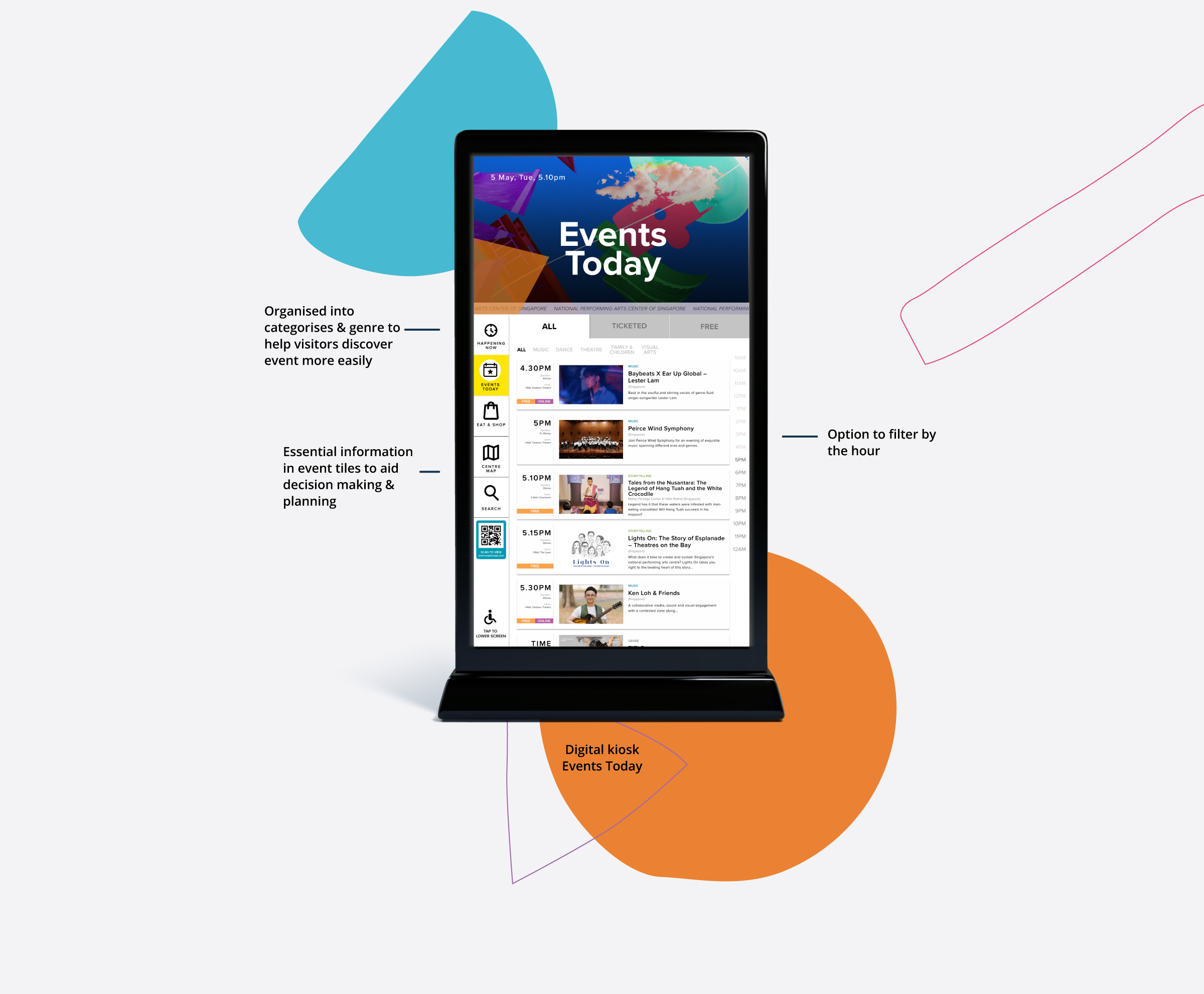
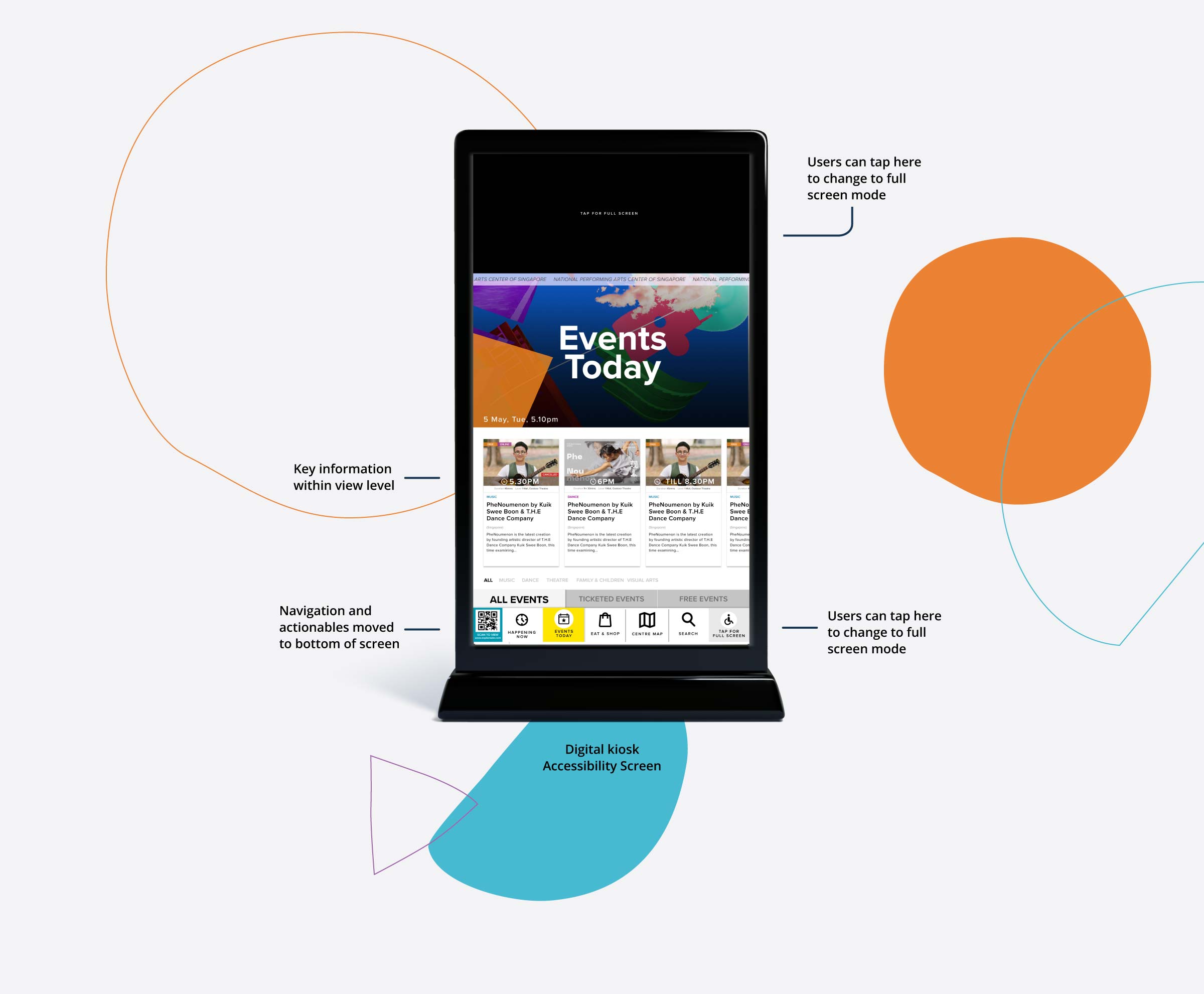
The kiosk features a dedicated page that lists all the events happening throughout the day, automatically updating to remove past events. Events are categorised into ‘All’, ‘Ticketed’, and ‘Free’, allowing users to easily select what they’re interested in. Additionally, visitors can filter events by specific hours to plan their visit around their availability.
Each event tile on this page provides essential information at a glance, including the start time, duration, location, genre, and artist, accompanied by an image and a short synopsis. Events are also clearly marked as ‘Free’ and/or ‘Online’ where applicable, ensuring that visitors can quickly understand the nature of each event.
03. Esplanade Mall
The kiosk is thoughtfully designed to not only feature events at Esplanade but also bring attention to the diverse offerings of Esplanade Mall. This ensures that visitors are well-informed about the full spectrum of experiences available, including shopping, dining, and entertainment.
Showcasing Mall Tenants
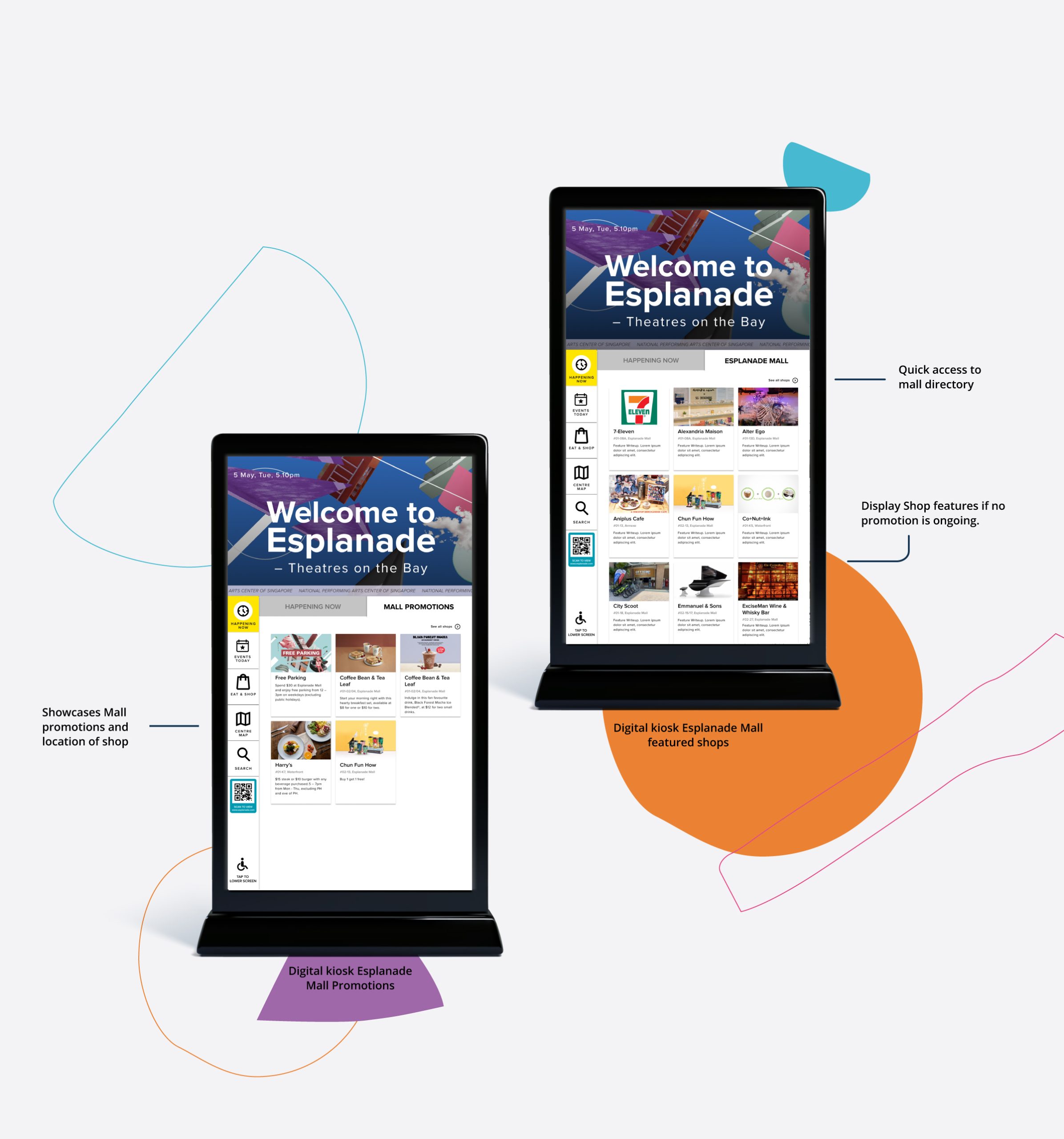
Mall Promotions: This screen highlights ongoing mall promotions, featuring special deals, discounts, and exclusive offers in dining, shopping, and more, encouraging visitors to explore and enhance their Esplanade experience.
Featured Shops and Restaurants: When there are no active promotions, the screen will showcase featured shops and restaurants, providing a glimpse into the variety and quality of the mall’s offerings. This strategy not only keeps visitors informed and engaged but also supports additional revenue opportunities for Esplanade by promoting its commercial tenants.
Mall Directory
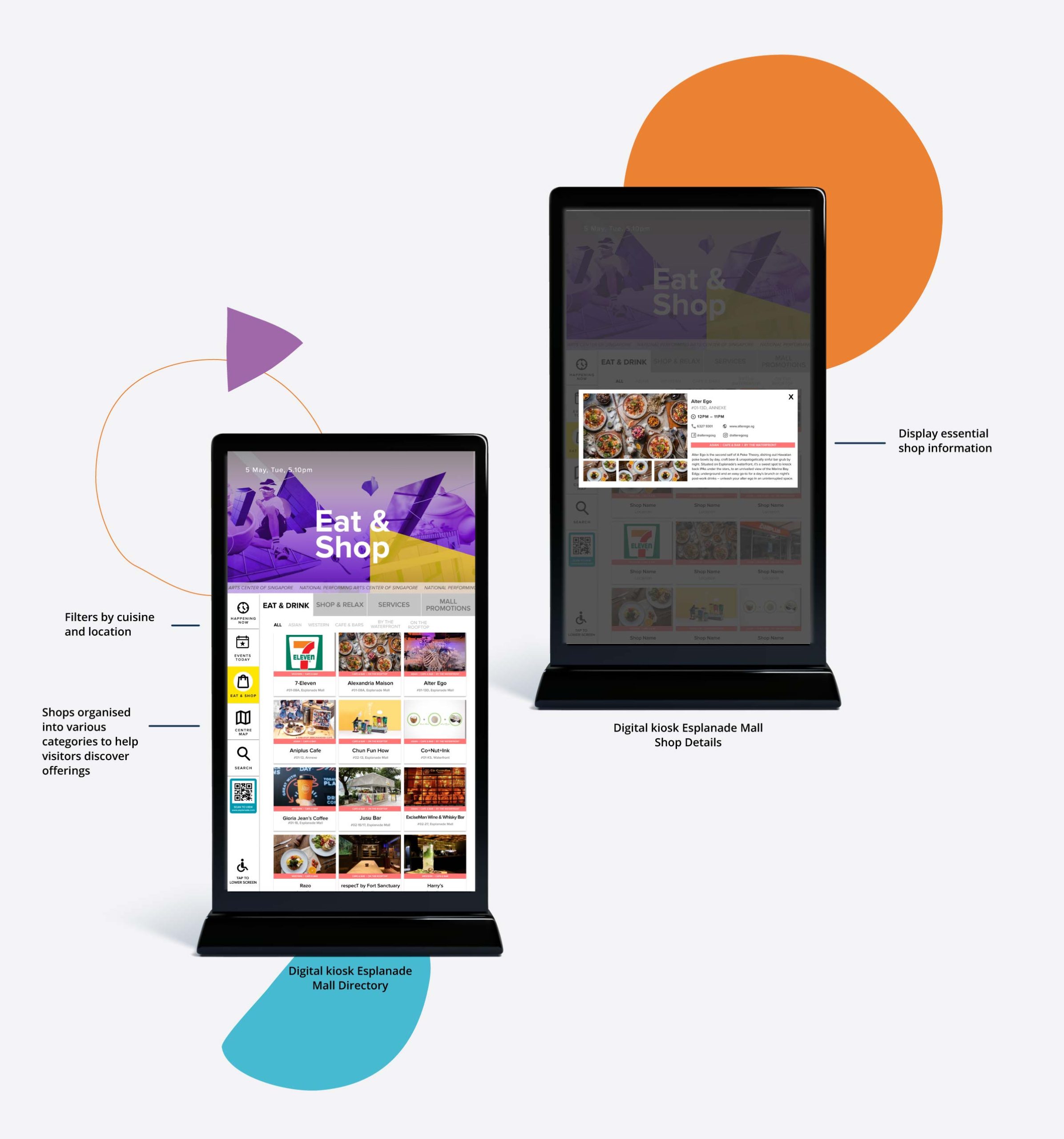
The Mall Directory page is a comprehensive showcase of all the shops in Esplanade, neatly organized into four main categories: Eat & Drink, Shop, Relax, and Services. This setup helps visitors quickly find what they need, whether they are looking for a place to dine, shop, unwind, or access various services.
To enhance the user experience and ensure visitors can easily find shops that meet their specific preferences, the directory includes additional filters based on cuisine, genre, and location. These filters make it straightforward for visitors to narrow down their choices and plan their visit more effectively, improving navigation and satisfaction.
04. Centre Map
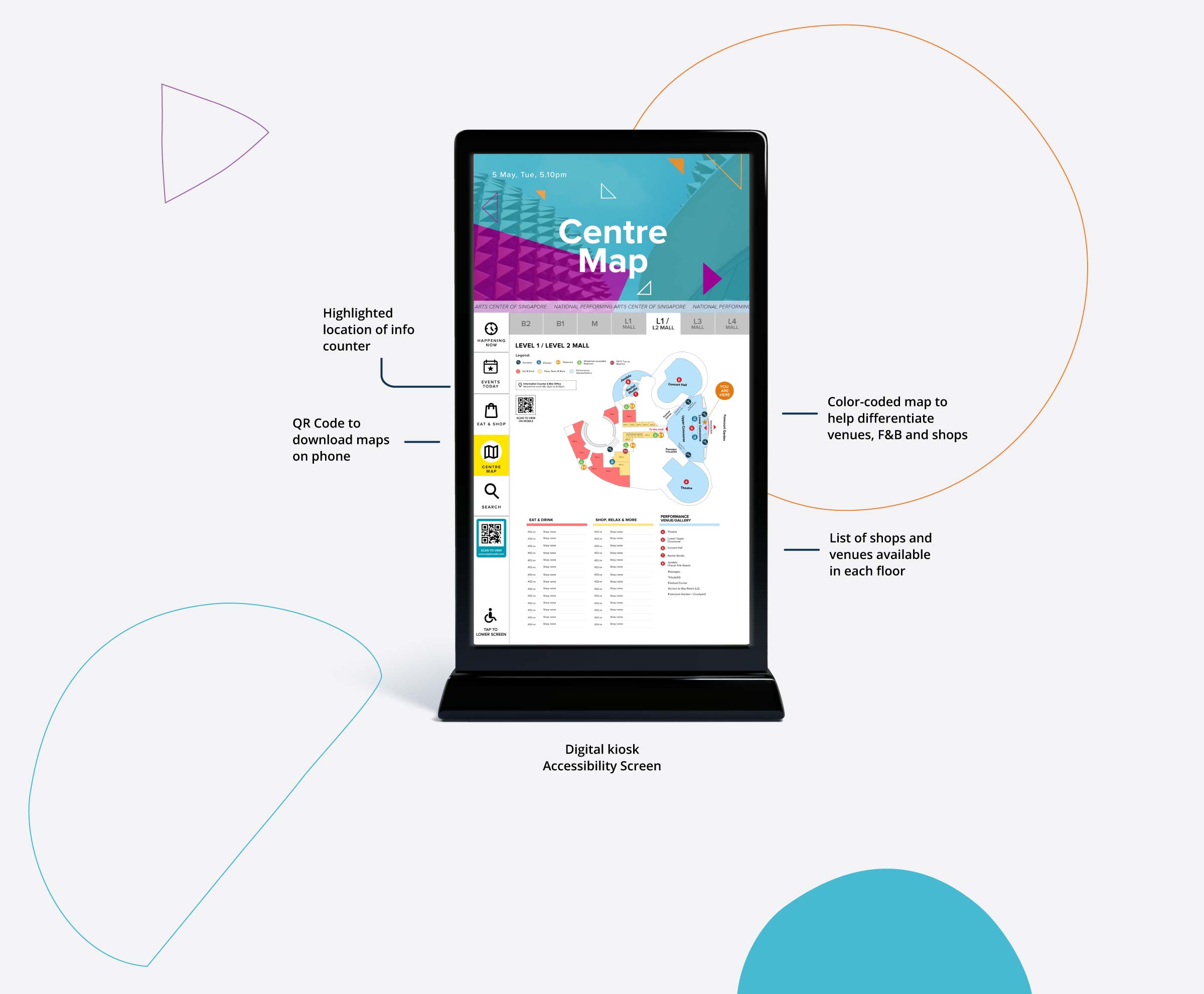
The Centre Map is designed to help visitors navigate Esplanade effectively. It includes a detailed map with legends and universal icons that mark various amenities, ensuring clarity and ease of use. The map’s areas are color-coded to distinguish between Eat & Drink locations, Shop & Relax shops, and performance venues. Additionally, essential information about the information counter and box office is prominently displayed, aiding visitors in finding these key services quickly.
Due to system limitations, the wayfinding solution provided is static. However, as a workaround, a QR code is included on the screen. Visitors can scan this code to download the map onto their phones, allowing them to refer to it throughout their visit for continuous, convenient navigation.
05. Accessibility
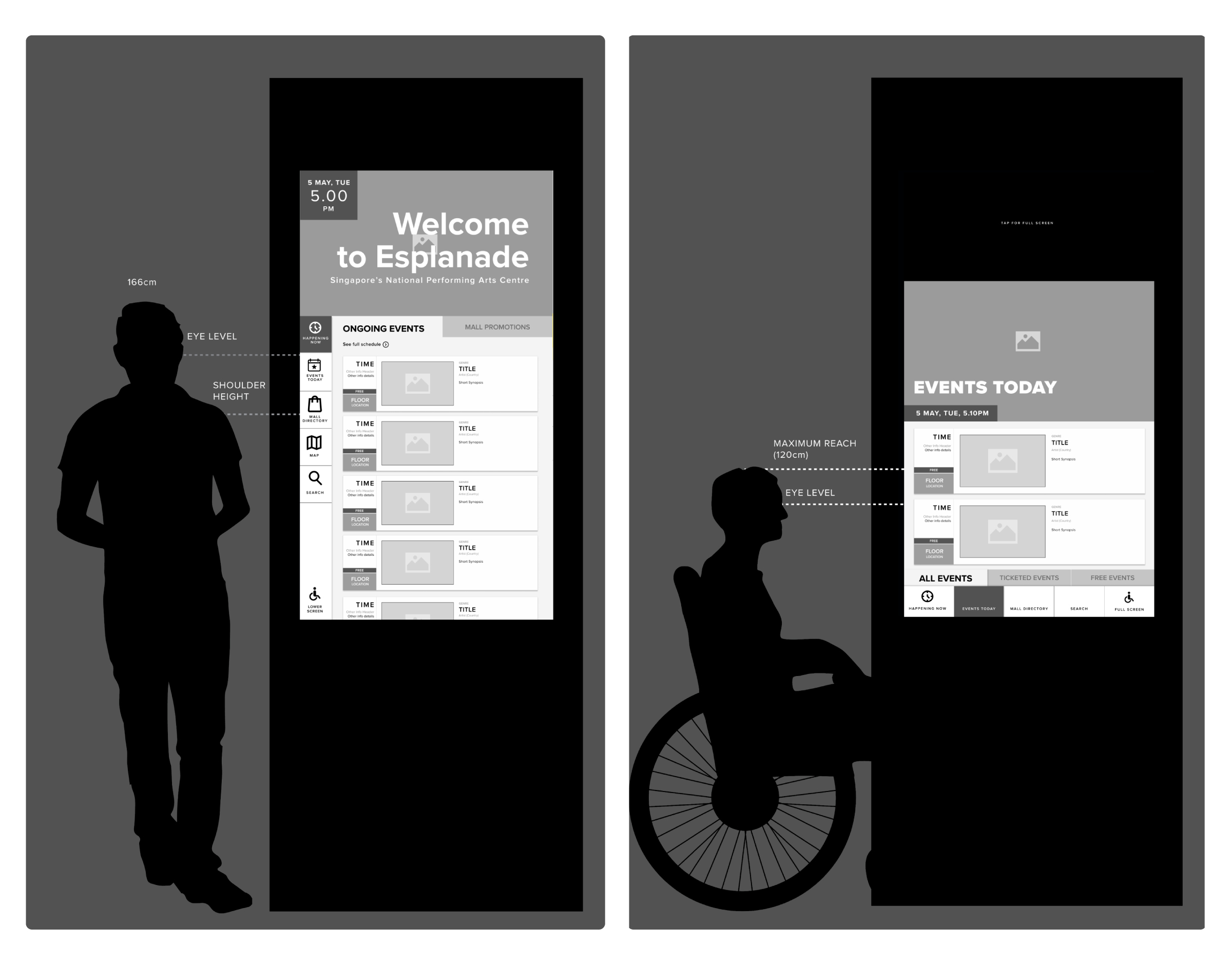
The kiosk is designed with accessibility in mind, especially for physically less-abled individuals. The UI layout is thoughtfully arranged so that all interactive elements like buttons and QR codes are within reach (<120cm), and essential information is displayed at eye level for easy viewing. The large screen size ensures that text is legible from at least 5 feet away, accommodating visitors with poor eyesight without difficulty.
In terms of visual accessibility, the color contrast will be tested against the WCAG guidelines to achieve at least an AA rating, ensuring that text and interactive elements stand out clearly for all users.
RESULTS
What was achieved in this project
This project successfully developed a digital kiosk for Esplanade to improve visitor orientation and information accessibility. The kiosk’s design includes a welcoming section that greets visitors upon entry, real-time displays of current and upcoming events, and an integrated mall directory showcasing promotions and shop categories.
It offers a detailed Centre Map to aids navigation, with a QR code allowing visitors to download the map for ongoing reference.
Designed with accessibility in mind, the kiosk’s layout ensures all interactive elements are within reach and essential information is at eye level. Text visibility from a distance and high color contrast meeting WCAG AA standards make it user-friendly for those with physical and visual impairments.
NEXT STEPS
Project Status and Future Considerations
While the UI/UX phase of this project was completed successfully, the deployment was put on hold due to COVID-19, as hygiene concerns reduced the usage of public touchpoints.
This project was reassessed with the aim of integrating a more holistic wayfinding solution.